


"LinkedIn automation" is a misleading phrase. It bundles five very different things into one search result: scheduling your own posts, blasting cold connection requests, scraping data, triggering outreach from intent signals, and commenting on other people's posts. The tool that's best at one of those is usually a bad fit for the others.
We tested 9 of the most popular LinkedIn automation tools in 2026 and grouped them by what they're actually best at. For each, we looked at how it handles its category, how the pricing scales, and who it's wrong for (so you don't buy the wrong kind of tool).
Here's what each one is genuinely good at, who should pick it, and which combinations actually work together.
TL;DR: Our 9 picks at a glance
- 1. Postbeam:best for B2B teams who want LinkedIn content and intent-based outreach in one system.
- 2. Expandi:best for sales teams running cold outreach at volume with anti-detection controls.
- 3. Dripify:best for solo SDRs who want a visual drip-campaign builder that mixes LinkedIn and email.
- 4. Linked Helper:best for budget operators willing to run a desktop app for the cheapest automation on the market.
- 5. Phantombuster:best for growth hackers who need data scraping plus chainable multi-platform automations.
- 6. Taplio:best for solo creators building a personal brand with AI hooks and a viral-post library.
- 7. HeyReach:best for lead-gen agencies running outreach at volume across many client LinkedIn accounts.
- 8. Gojiberry:best for B2B founders and SDRs who want AI-scored warm leads from intent signals.
- 9. Go Extrovert:best for creators who want to build reach through thoughtful AI-assisted comments on other people's posts.
The 5 categories of LinkedIn automation
Before ranking, it helps to separate the categories, because a great tool in one is often a bad tool in another:
📅 Content scheduling
Plan, write, and publish posts at the right time. Postbeam and Taplio specialize here; Taplio leans creator, Postbeam leans team.
📨 Cold outreach
Connection requests, InMails, and follow-ups at scale. Expandi, Dripify, HeyReach, and Linked Helper fight for this category at different price points.
🔍 Scraping and chains
Extract data from LinkedIn, enrich it, and pipe it into other workflows. Phantombuster is the dominant tool here.
🎯 Intent-signal outreach
Only reach out when a prospect shows buying signals. Gojiberry is built for this; Postbeam does it from your own content.
💬 Comment automation
Build reach by engaging on other people's posts instead of publishing more of your own. Go Extrovert is the only tool in this list focused purely here.
🧩 Combinations that work
Postbeam plus Gojiberry covers content plus intent outreach. HeyReach plus Taplio covers agency outreach plus creator content. Go Extrovert layers on top of any content stack.
The 9 Best LinkedIn Automation Tools in 2026
1. Postbeam - best for B2B teams who want LinkedIn content and intent-based outreach in one system
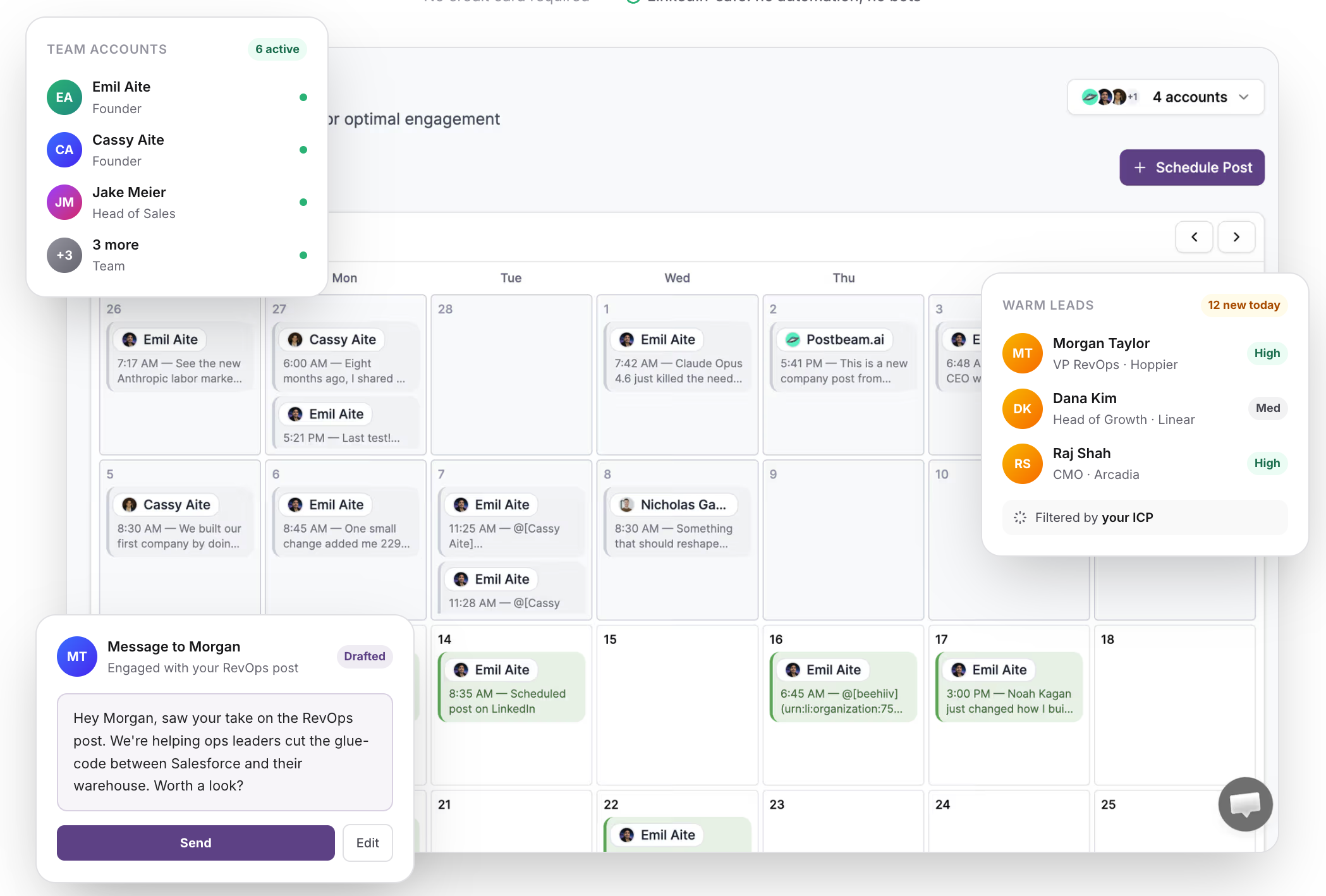
Postbeam is the only tool in this list that connects content to outreach. Every scheduled post becomes a warm-lead surface: engagers get filtered by ICP and ranked by intent, so your calendar doubles as a pipeline engine. If Taplio is for solo creators and Expandi is for cold senders, Postbeam sits in the middle and serves the team use case neither covers.
What is Postbeam?
Postbeam is an AI-powered LinkedIn platform for GTM teams. You plan posts on a shared calendar, draft in a brand voice presets library, and see which engagers on every post match your ICP the moment they react. It publishes through LinkedIn's official partner APIs, so there are no Chrome extensions or automation flags touching your account.
Why Postbeam stands out
- Intent-signal outreach: likes, comments, and reshares on your posts (or competitor posts in your niche) trigger warm-lead lists filtered by ICP.
- Multi-account scheduling and employee advocacy in the same workspace, so founders, SDRs, and CMOs can coordinate in one place.
- AI writer trained on high-performing LinkedIn posts with brand-voice presets per teammate.
- Team pricing that stays flat at $39/user/mo instead of jumping past $99/seat like other automation tools.
- Safe publishing through LinkedIn's official partner APIs, with zero Chrome-extension risk.
Postbeam pricing
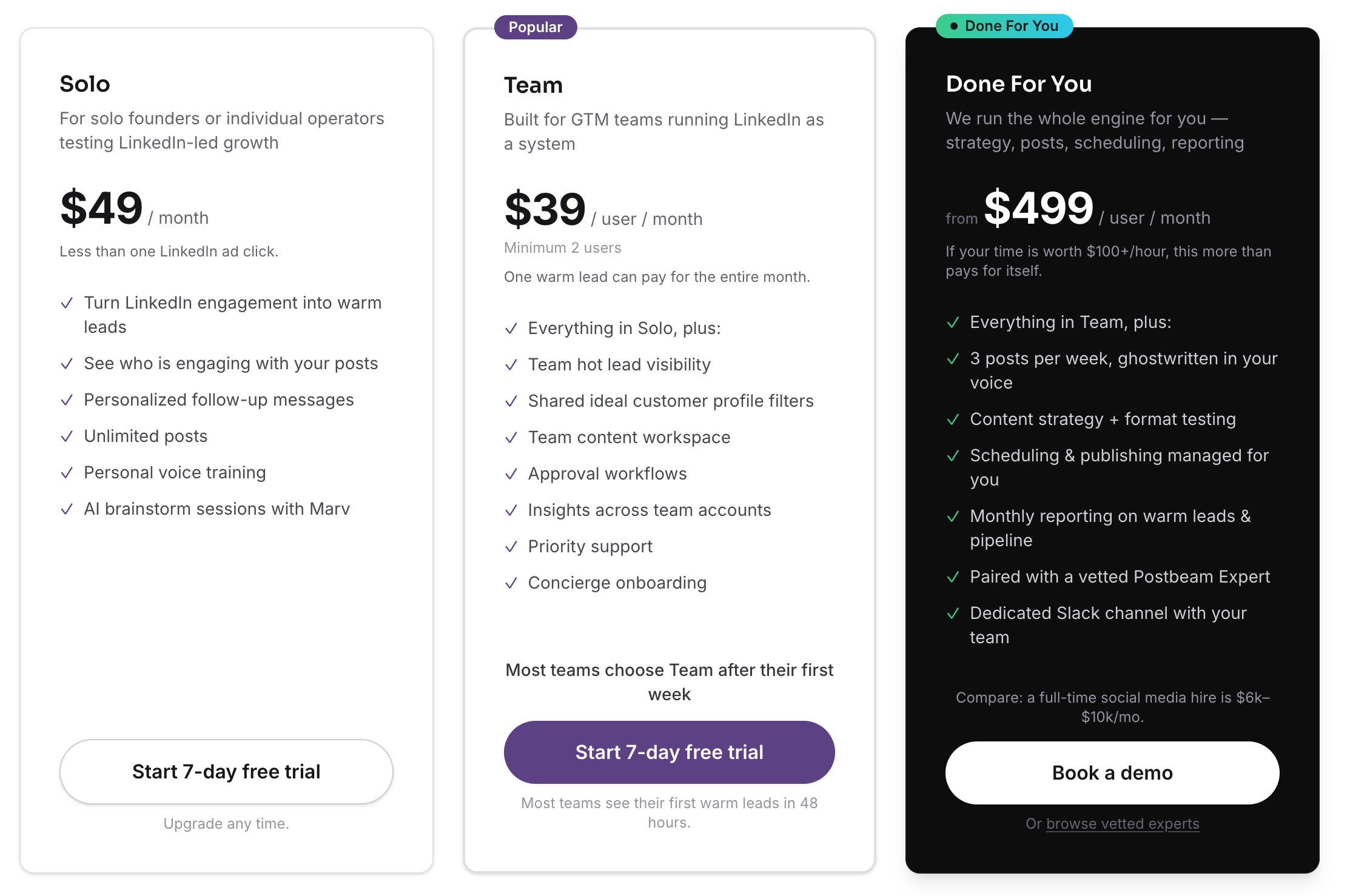
Solo $49/mo · Team $39/user/mo · Done For You $499/user/mo
Solo is $49/mo for individual founders. Team is $39/user/mo with a 2-user minimum, and one warm lead can pay for the whole month. Done For You is $499/user/mo and bundles strategy, posts, scheduling, and reporting with a vetted Postbeam Expert. Free trial is 7 days, no credit card required.
Postbeam in action
✅ Pros
- +The only automation tool that turns your own content into warm leads
- +LinkedIn-native and built for teams out of the box
- +Brand-voice presets so teammates sound like themselves
- +Safe publishing (official LinkedIn partner APIs)
- +Team pricing scales cheaper than Expandi, HeyReach, or Phantombuster
❌ Cons
- −LinkedIn-first by design; not a multi-network automation suite
- −Outreach is intent-based, not cold-outbound at the Expandi scale
Who is Postbeam best for?
Postbeam is the right pick if LinkedIn is a GTM motion, not just a publishing channel. Best fit for founder-led startups, GTM teams, and agencies who want scheduling, advocacy, and warm-lead signal in one product instead of stitching three tools together.
2. Expandi - best for sales teams running cold outreach at volume with anti-detection controls
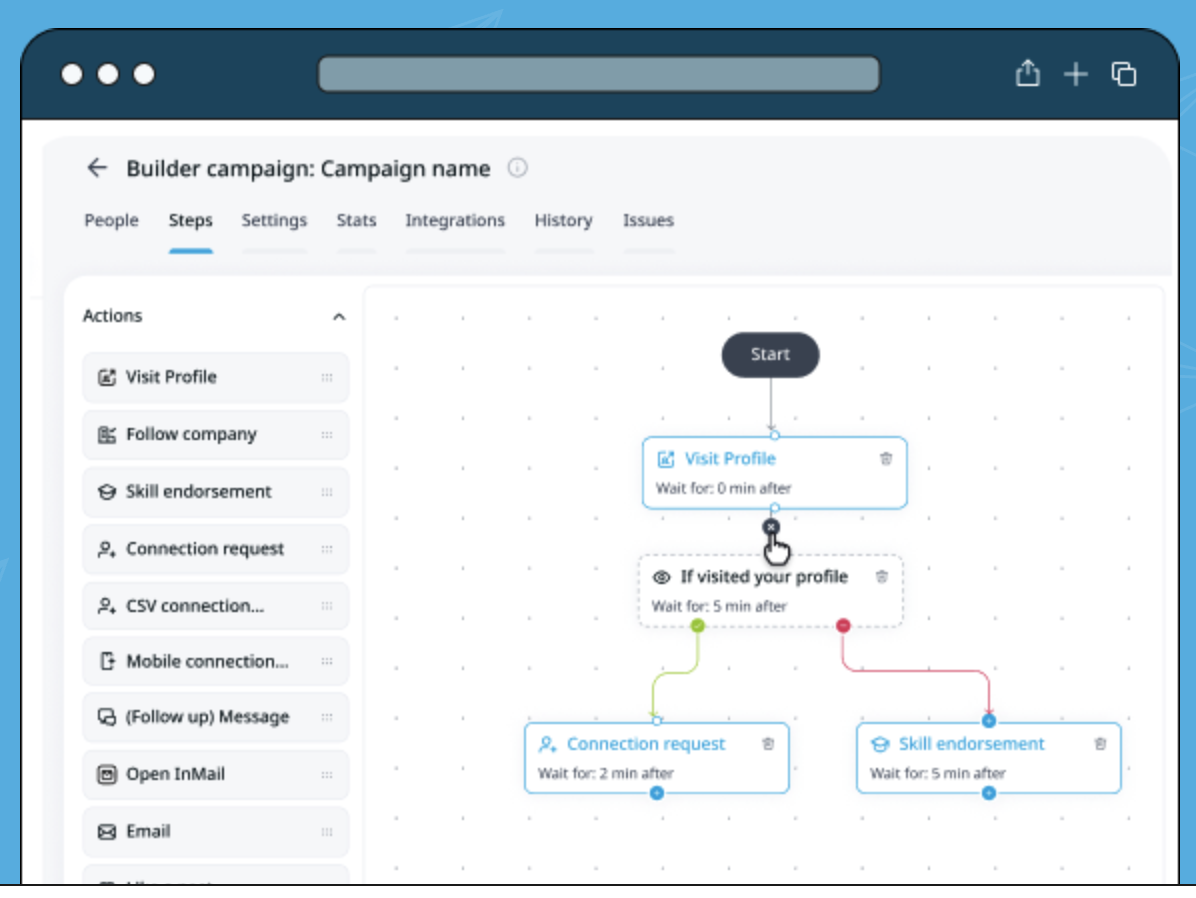
Expandi is the serious cold-outreach rig. Dedicated IPs, profile warmup, smart rate limits, and a campaign builder that chains connection requests, InMails, and follow-ups. It doesn't touch content; it's built for sales teams who need to run high-volume outbound without tripping LinkedIn's defenses.
What is Expandi?
Expandi is a cloud-based LinkedIn outreach automation platform. It runs 24/7 on a dedicated country-based IP, warms up your profile, respects daily limits, and offers a visual Builder to sequence any mix of LinkedIn actions (visit profile, follow, endorse, connection request, InMail, email).
Why Expandi stands out
- Dedicated country-based IP address per seat for better account safety.
- Profile auto-warmup and smart algorithms that stay inside LinkedIn's limits.
- Builder campaigns that chain visits, endorsements, connection requests, and InMails into a single flow.
- Multichannel outreach that mixes LinkedIn and email in the same sequence.
- Agency plan includes white-label, centralized campaign management, and template sharing.
Expandi pricing
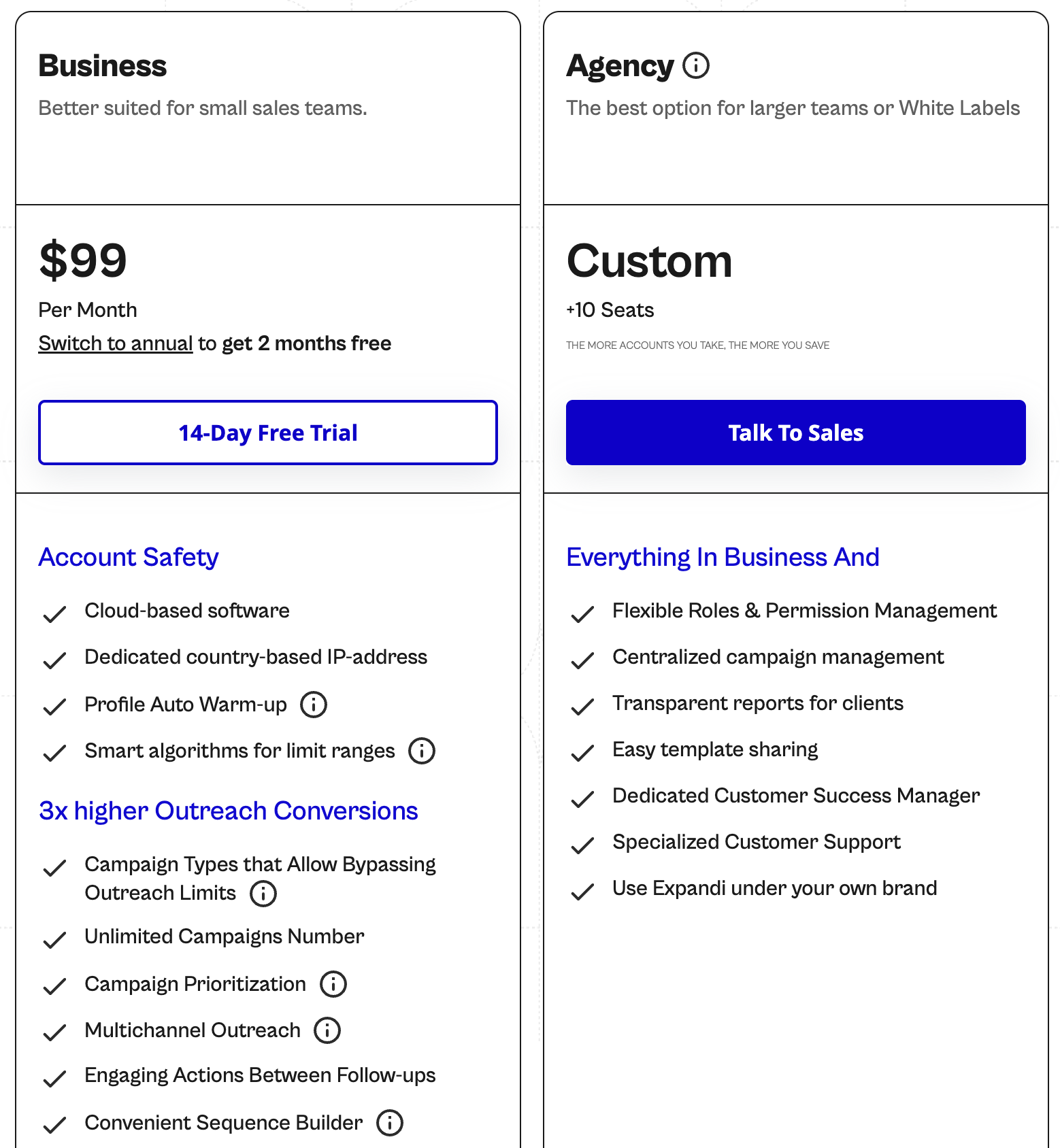
Business $99/mo · Agency Custom (10+ seats)
Business is $99/mo per seat with cloud-based software, dedicated country-based IP, profile auto-warmup, smart algorithms for limit ranges, campaign types that bypass outreach limits, unlimited campaigns, campaign prioritization, multichannel outreach, engaging actions between follow-ups, and the Builder sequence editor. 14-day free trial. Switch to annual for 2 months free. Agency is custom pricing for 10+ seats and adds flexible roles and permissions, centralized campaign management, transparent client reports, template sharing, a dedicated Customer Success Manager, white-label, and specialized support.
Expandi in action
✅ Pros
- +One of the safest LinkedIn outreach engines with dedicated IPs and warmup
- +Powerful Builder flow for complex multistep sequences
- +White-label and agency features baked in at the Agency tier
❌ Cons
- −$99/seat/mo adds up fast for teams
- −Purely outreach; no content scheduling or publishing
- −Aggressive setups can still trigger LinkedIn restrictions if you push limits
Who is Expandi best for?
Expandi is the right pick if you run high-volume cold outbound and need the safest cloud rig you can buy. Skip it if you want content plus outreach in one tool.
3. Dripify - best for solo SDRs who want a visual drip-campaign builder that mixes LinkedIn and email
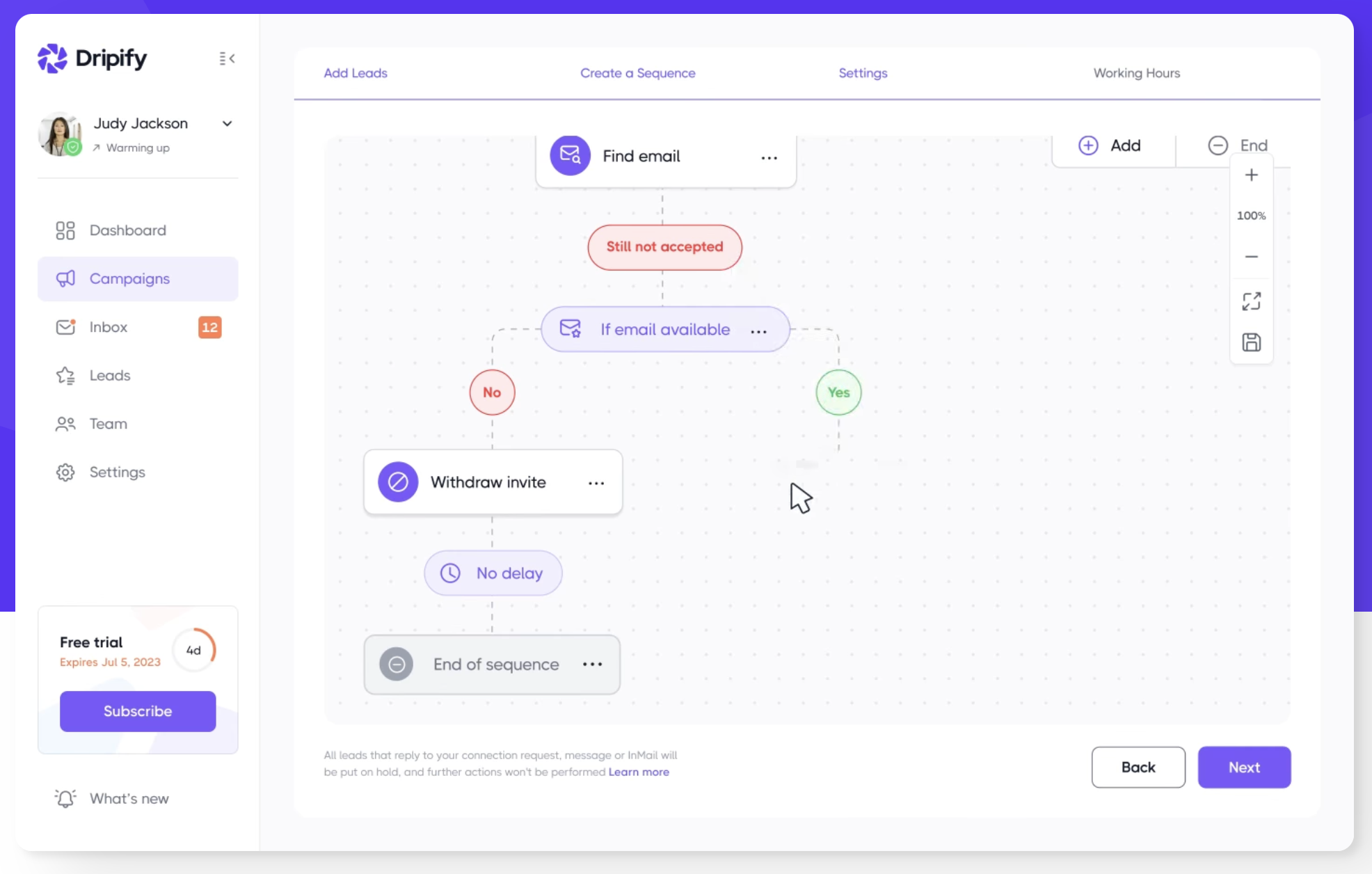
Dripify is the drip-campaign specialist. Where Expandi thinks in builder flows and HeyReach thinks in account networks, Dripify thinks like a marketing automation tool. You design branches (if email found, do this; if connection accepted, wait 2 days, send message) in a clean visual editor.
What is Dripify?
Dripify is a LinkedIn automation tool centered on drip sequences. It combines LinkedIn actions with email steps, branches on conditions (email availability, connection accepted, reply received), and ships a dedicated inbox, CSV exports, and webhooks on higher tiers.
Why Dripify stands out
- Visual sequence editor with conditional branches (if email available, if connection accepted, etc.).
- LinkedIn and email actions in the same flow (email finder with 100 credits/month baseline).
- Dedicated inbox plus CSV export and webhooks on Pro/Advanced.
- Built-in LinkedIn protection to stay within safe daily limits.
- Team management, lead tagging, and step analytics on higher tiers.
Dripify pricing
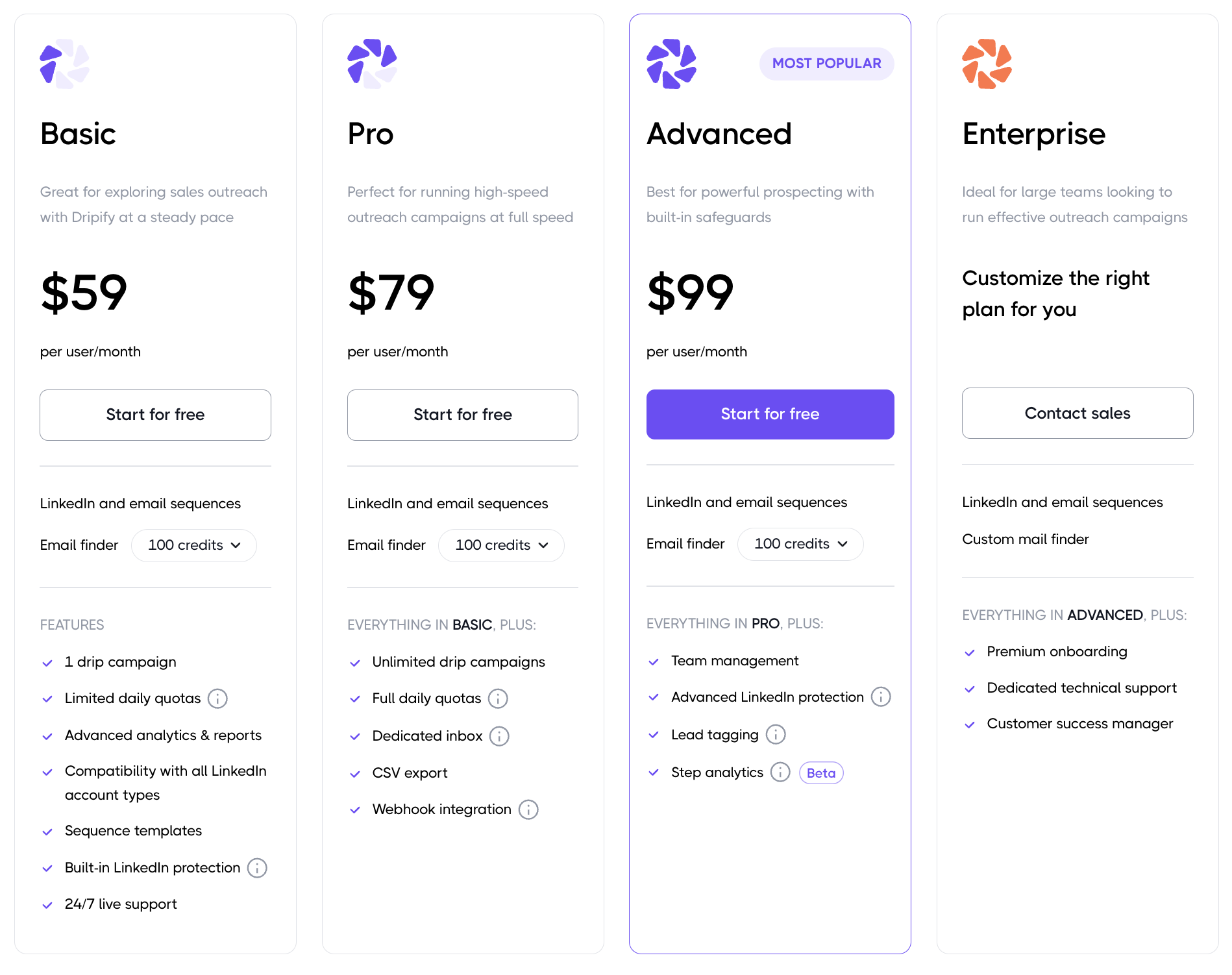
Basic $59/user/mo · Pro $79/user/mo · Advanced $99/user/mo · Enterprise Custom
Basic is $59/user/mo with 1 drip campaign, limited daily quotas, advanced analytics and reports, compatibility with all LinkedIn account types, sequence templates, built-in LinkedIn protection, and 24/7 live support. Pro is $79/user/mo with unlimited drip campaigns, full daily quotas, a dedicated inbox, CSV export, and webhook integration. Advanced is $99/user/mo (Most Popular) and adds team management, advanced LinkedIn protection, lead tagging, and step analytics. Enterprise is custom and adds premium onboarding, dedicated technical support, and a customer success manager.
Dripify in action
✅ Pros
- +Cleanest visual drip-campaign builder in the category
- +Branches on conditions, which most outreach tools don't do natively
- +Team management and lead tagging on the Advanced plan
❌ Cons
- −Email finder credits are capped at 100/mo on every plan
- −No content scheduling or warm-lead signal from content
- −Pricing has crept up; Basic is no longer the cheap entry it once was
Who is Dripify best for?
Dripify is the right pick if you think about outreach as drip campaigns with branches. Solo SDRs and small sales teams get the most out of it; larger agencies usually prefer HeyReach's multi-account model.
4. Linked Helper - best for budget operators willing to run a desktop app for the cheapest automation on the market
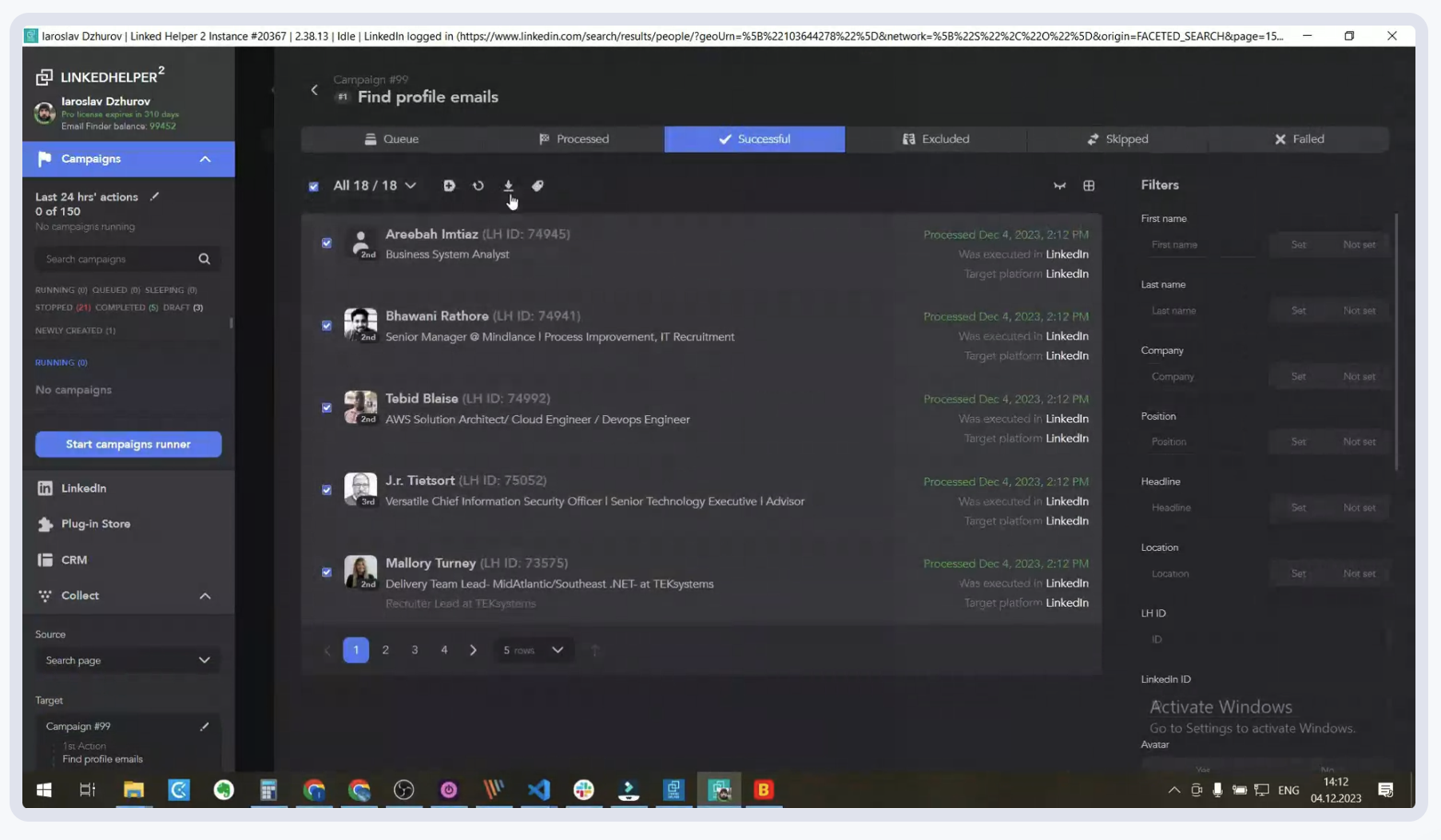
Linked Helper is the old-school desktop tool that keeps winning on price. It's not cloud-based, it looks like it did in 2018, and you need your laptop awake for campaigns to run. But at $15/mo for Standard, nothing else in this list comes close on price.
What is Linked Helper?
Linked Helper is a desktop LinkedIn automation app that runs campaigns locally. It supports connection requests, messaging, profile visits, skill endorsements, and email scraping, with a built-in CRM, template library, and campaign scheduler.
Why Linked Helper stands out
- Cheapest serious LinkedIn automation tool in the market at $15/mo.
- Desktop-based, so nothing about your activity passes through a third-party cloud.
- Built-in CRM and campaign snapshots; no separate dashboard needed.
- One license covers one LinkedIn account, and you can switch which account the license is attached to.
- Free 14-day trial with all features included.
Linked Helper pricing
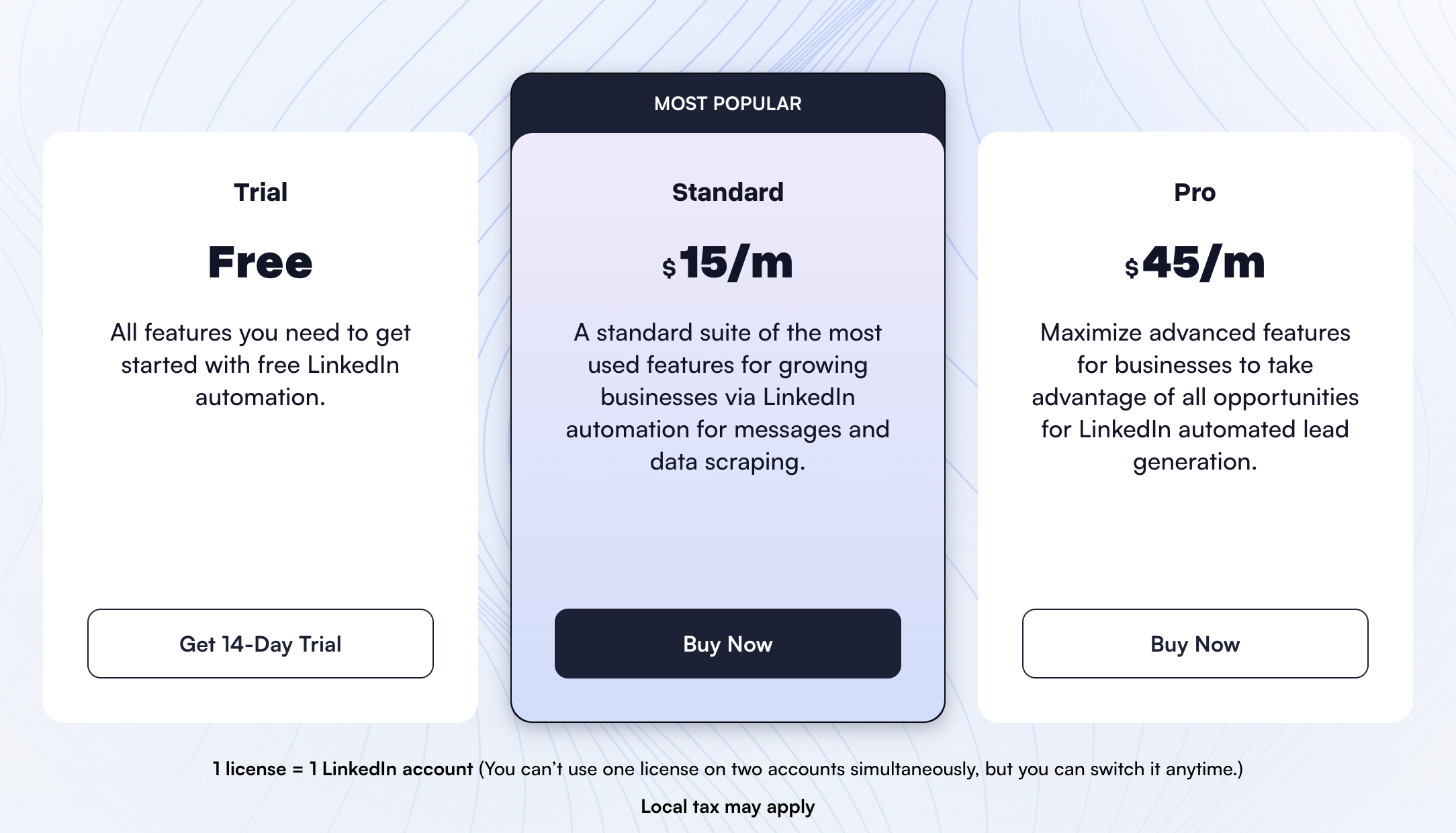
Trial Free · Standard $15/mo · Pro $45/mo
Trial is Free for 14 days with all features. Standard is $15/mo (Most Popular) with the standard suite of features for LinkedIn automation, messages, and data scraping. Pro is $45/mo and maximizes advanced features for businesses running LinkedIn automated lead generation. 1 license equals 1 LinkedIn account; you can switch the linked account anytime.
Linked Helper in action
✅ Pros
- +By far the cheapest entry price for real LinkedIn automation
- +Local desktop software keeps activity off third-party servers
- +Long track record; battle-tested since 2016
❌ Cons
- −Desktop only, so your computer has to stay on during campaigns
- −Dated UI compared to cloud-based Expandi, HeyReach, or Gojiberry
- −Per-license model gets clunky if you manage multiple LinkedIn accounts
Who is Linked Helper best for?
Linked Helper is the right pick if price is the primary constraint and you'll babysit a desktop app. Anyone running serious team outreach should look at Expandi, Gojiberry, or HeyReach instead.
5. Phantombuster - best for growth hackers who need data scraping plus chainable multi-platform automations
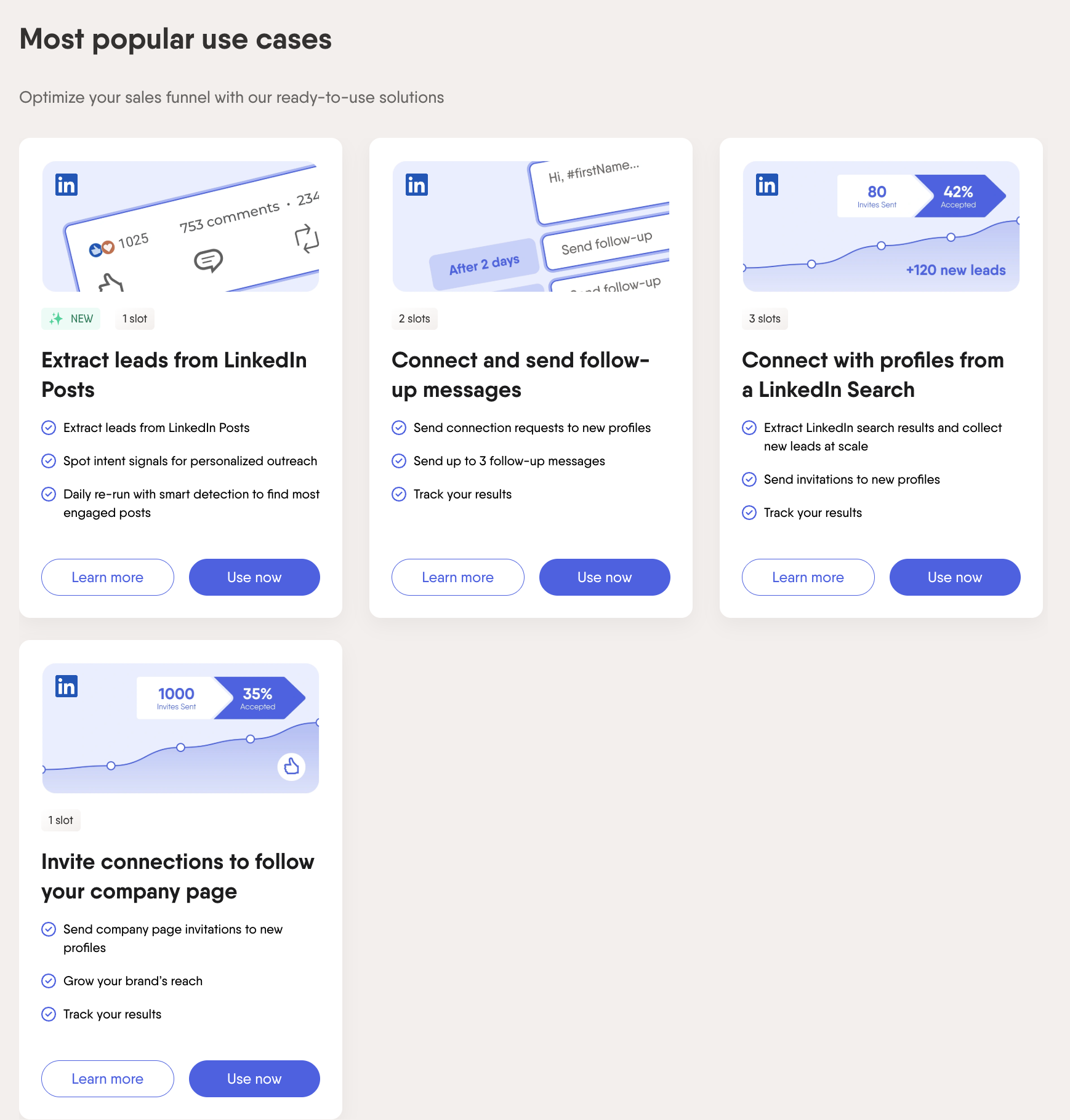
Phantombuster isn't a LinkedIn tool. It's a multi-platform automation engine that happens to have the best LinkedIn scrapers on the market. You chain Phantoms (scrape a Sales Nav search, enrich with emails, invite to follow a company page, message accepted invites) across LinkedIn, Twitter, Google Maps, Instagram, and more.
What is Phantombuster?
Phantombuster is a cloud automation platform with hundreds of ready-to-use Phantoms (automations) across LinkedIn, Twitter, Google Maps, Instagram, and Sales Navigator. You connect a Phantom, feed it a URL or CSV, and chain outputs into the next step. It's scraping-first, outreach-second.
Why Phantombuster stands out
- The broadest library of LinkedIn Phantoms: extract leads from posts, scrape search results, invite connections to follow a company, send follow-ups at scale.
- Multi-platform reach: LinkedIn, Twitter, Google Maps, Instagram, Sales Navigator, and others.
- Chainable workflows: the output of one Phantom becomes the input of the next.
- URL finder credits and AI credits bundled on every paid tier.
- Expert onboarding and unlimited exports on higher plans.
Phantombuster pricing
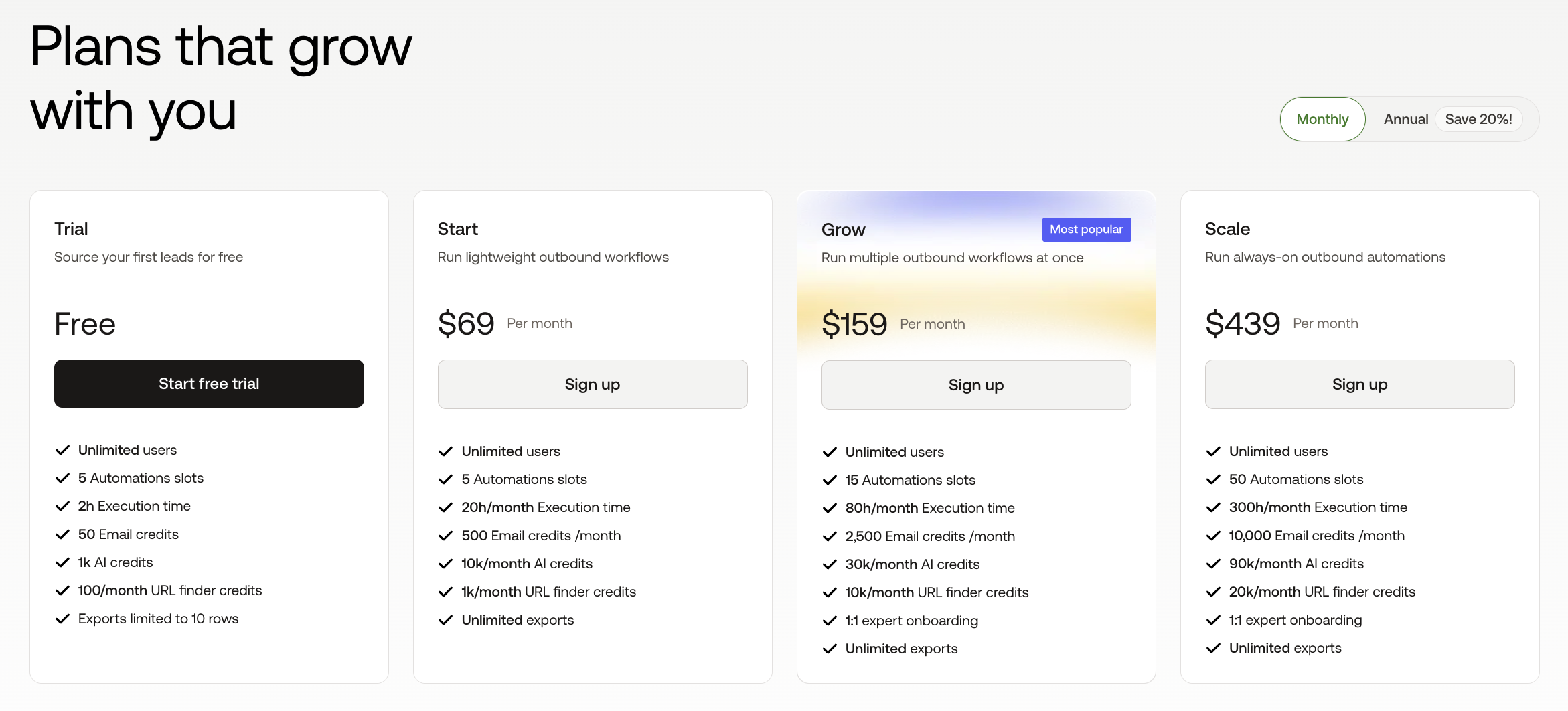
Trial Free · Start $69/mo · Grow $159/mo · Scale $439/mo
Trial is Free (limited to 10 rows in exports). Start is $69/mo with 5 automations slots, 20 hours/month execution time, 500 Email credits, 10k URL finder credits, 1k AI credits, and exports limited to 1k rows. Grow is $159/mo (Most popular) with 15 slots, 80 hours/mo, 2,500 Email credits, 30k URL finder credits, 10k AI credits, 11 expert onboarding sessions, and unlimited exports. Scale is $439/mo with 300 hours/mo, 10k Email credits, 90k URL finder credits, and unlimited exports. Monthly or annual (save 20%) billing.
Phantombuster in action
✅ Pros
- +Nothing else matches Phantombuster for LinkedIn data extraction breadth
- +Cross-platform chains unlock growth hacks single-tool outreach can't do
- +Strong credit bundles for email finder and AI tasks
❌ Cons
- −Steep learning curve; not plug-and-play for non-technical teams
- −LinkedIn scraping sits in a gray zone and can trigger account limits if misused
- −Pricing scales fast as you add execution time and Phantoms
Who is Phantombuster best for?
Phantombuster is the right pick if you treat LinkedIn as one node in a larger growth-hacking graph. Overkill if all you want is connection requests and follow-ups.
6. Taplio - best for solo creators building a personal brand with AI hooks and a viral-post library
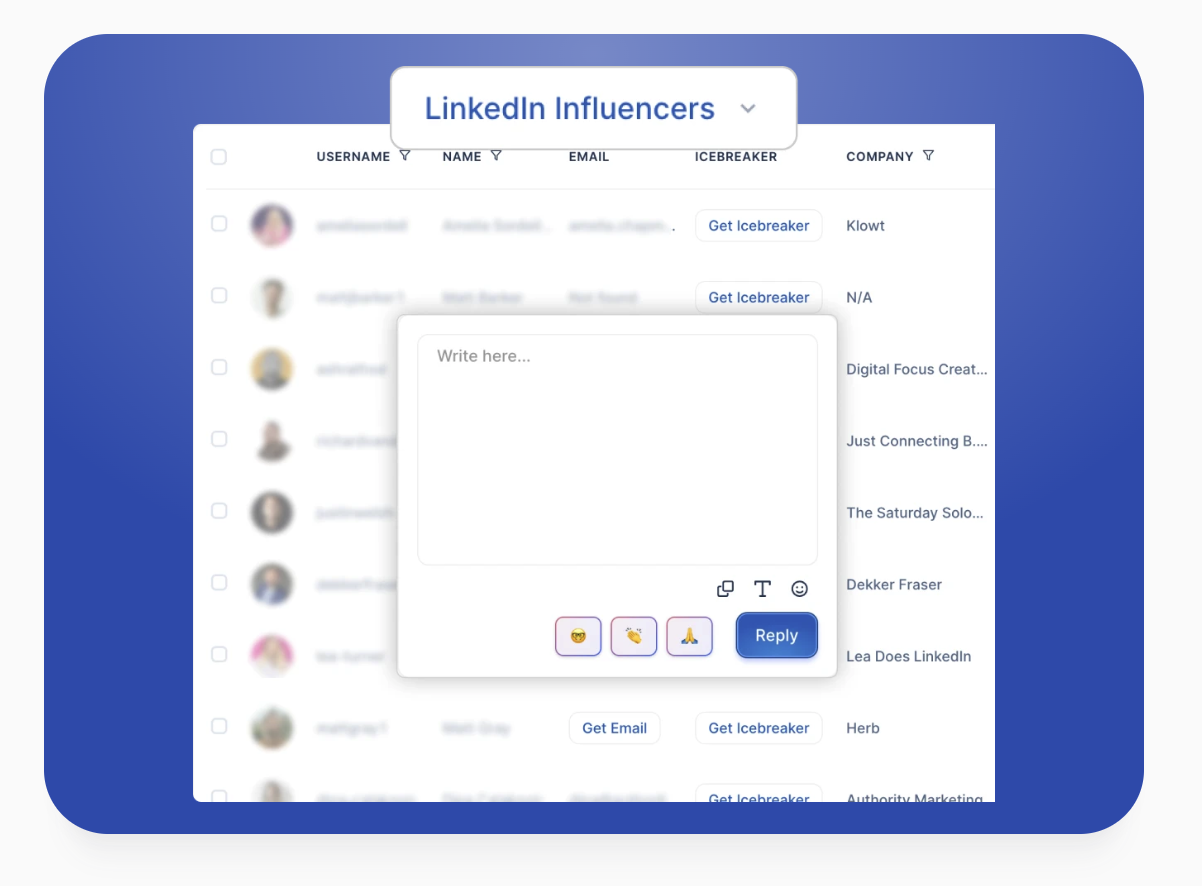
Taplio is the only tool in this list pointed purely at content. No outreach builder, no scraping, no multi-account workflow. Just the deepest LinkedIn inspiration library on the market and an AI writer tuned for hooks, paired with auto-DMs and auto-connection requests on the top tier.
What is Taplio?
Taplio is a LinkedIn-first scheduling, analytics, and AI-writing tool. It pairs 5M+ post ideas with an AI writer, a carousel builder, post analytics, and a light CRM. Pro unlocks a 3M+ lead database, mass DMs, and auto-connection requests to grow your network.
Why Taplio stands out
- One of the largest libraries of high-performing LinkedIn posts to pull inspiration from.
- AI writer tuned for LinkedIn hooks, with scroll-stopper and viral post generators.
- Carousel builder and native support for polls and document posts.
- Pro tier unlocks a 3M+ lead database, mass DMs to an audience, and auto-connection requests.
- Light CRM that tracks 1:1 LinkedIn conversations without leaving the app.
Taplio pricing
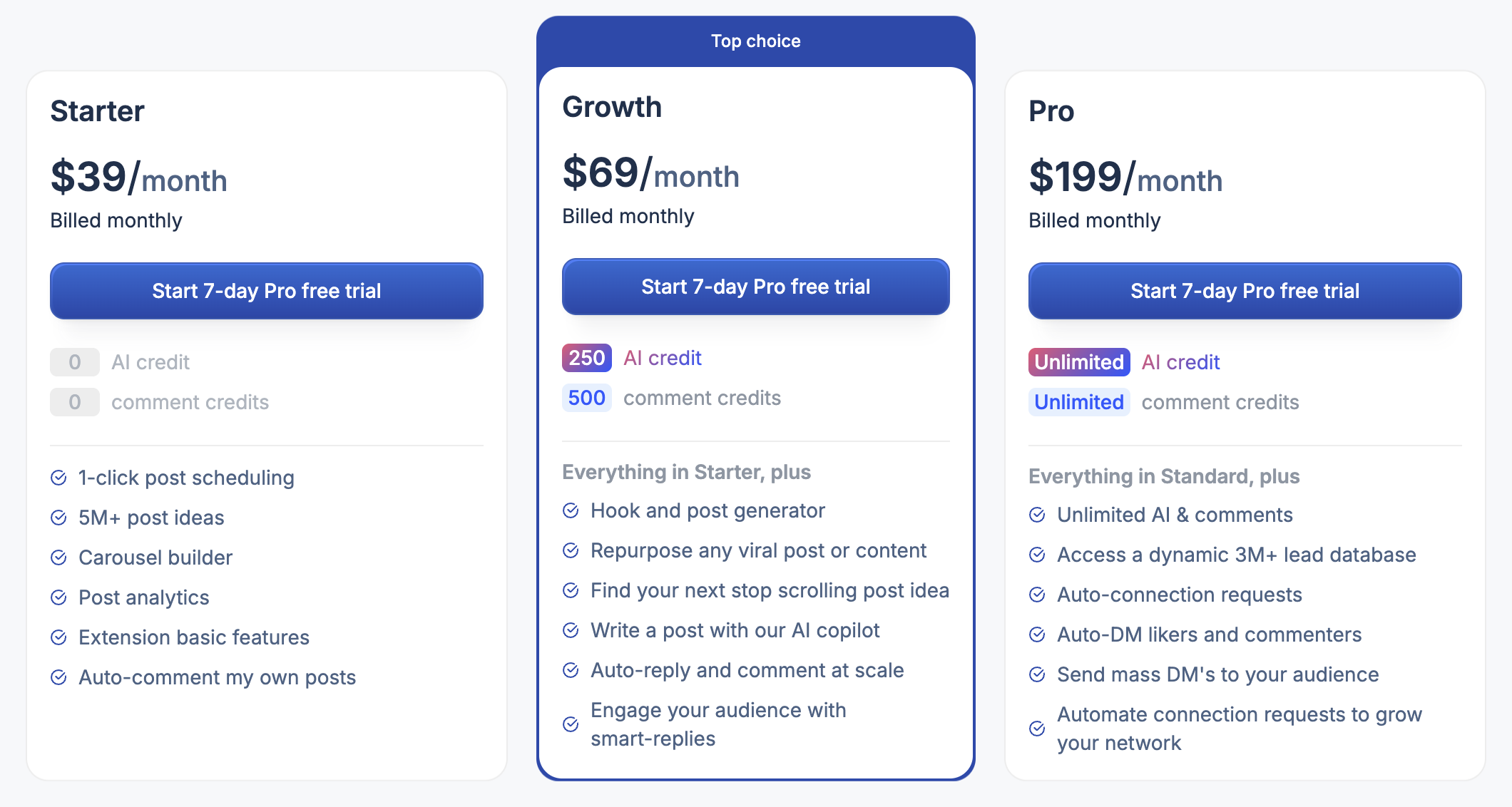
Starter $39/mo · Growth $69/mo · Pro $199/mo
Starter is $39/mo billed monthly with 1-click post scheduling, 5M+ post ideas, carousel builder, post analytics, extension basic features, and auto-comment on your own posts. Growth is $69/mo (Top choice) and adds 250 AI credits, 500 comment credits, hook and viral post generators, AI copilot, auto-reply and comment at scale, and smart-reply engagement. Pro is $199/mo with unlimited AI credits and comments, a 3M+ lead database, auto-connection requests, auto-DM to likers and commenters, mass DMs to an audience, and automated connection-building.
Taplio in action
✅ Pros
- +Deepest inspiration library and best hook generator for LinkedIn
- +Carousel, poll, and document support out of the box
- +Pro tier bundles outreach-adjacent features (auto-DM, auto-connect)
❌ Cons
- −No team or agency workflow; everything is solo-seat
- −AI output often feels generic without meaningful editing
- −Pro tier jumps to $199/mo to unlock mass DMs and lead database
Who is Taplio best for?
Taplio is the right pick if you're a solo creator building a personal brand and you rely on content plus light outreach automation. Teams and agencies will outgrow it quickly.
7. HeyReach - best for lead-gen agencies running outreach at volume across many client LinkedIn accounts
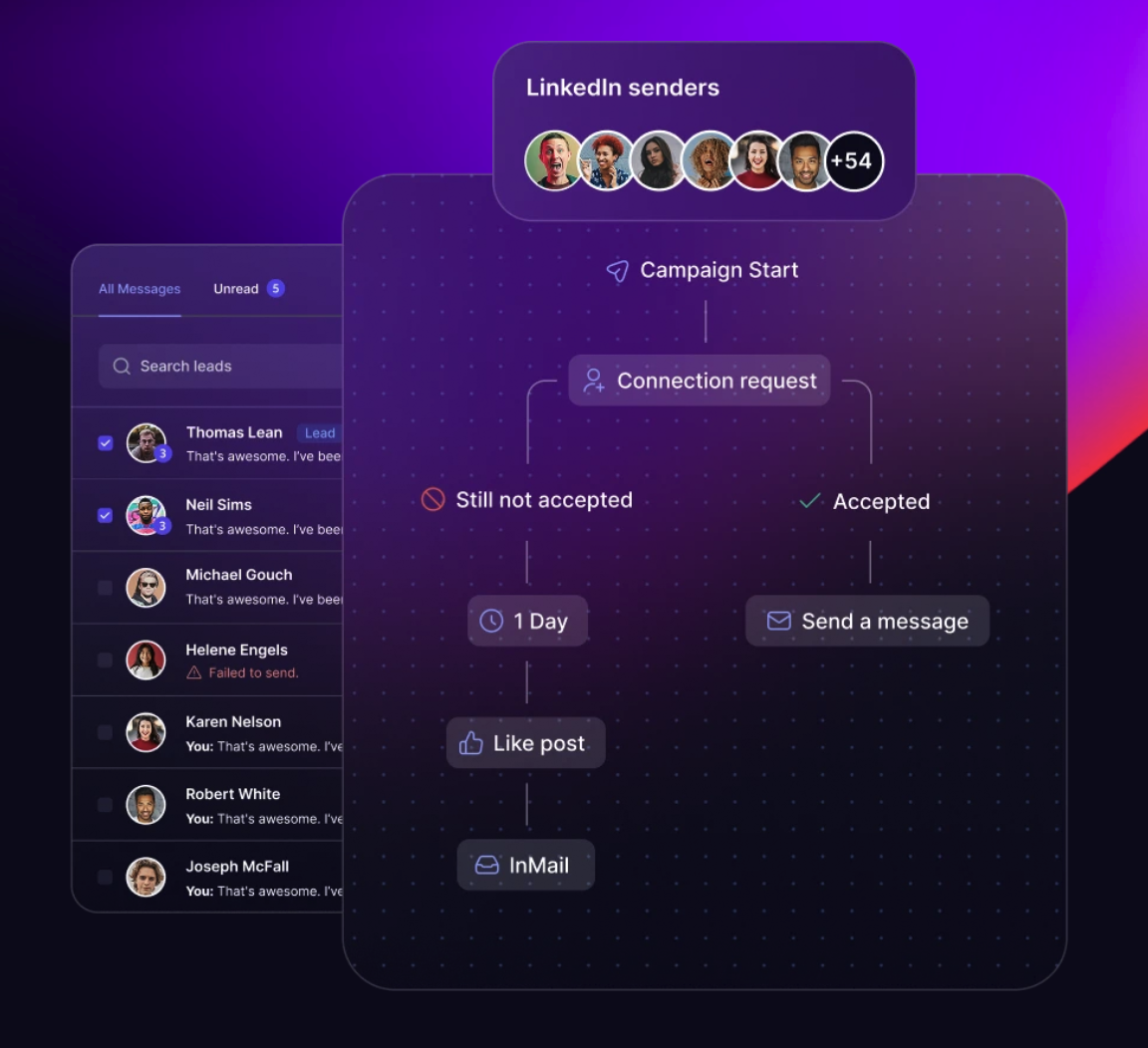
HeyReach is the agency outreach tool. Every other tool in this list charges per seat; HeyReach scales by sender, with an Unlimited tier that lets you run as many senders as you want from one workspace. White-label, MCP server, and done-for-you onboarding come bundled on the higher tiers.
What is HeyReach?
HeyReach is a LinkedIn outreach platform built for agencies. You add client LinkedIn accounts as senders, run unified campaigns across them, and manage every conversation from one unified inbox. It supports multichannel outreach (LinkedIn plus email), integrations, API/webhooks, and workspaces with permissions.
Why HeyReach stands out
- Unlimited senders on the Unlimited plan (nothing else in this list matches).
- Unified inbox across every sender, so your team sees every reply in one place.
- White-label on Agency and Unlimited; run HeyReach under your own brand for clients.
- MCP server for integrating HeyReach with AI agents and custom workflows.
- Done-for-you onboarding, migration, and dedicated Slack channel on higher tiers.
HeyReach pricing
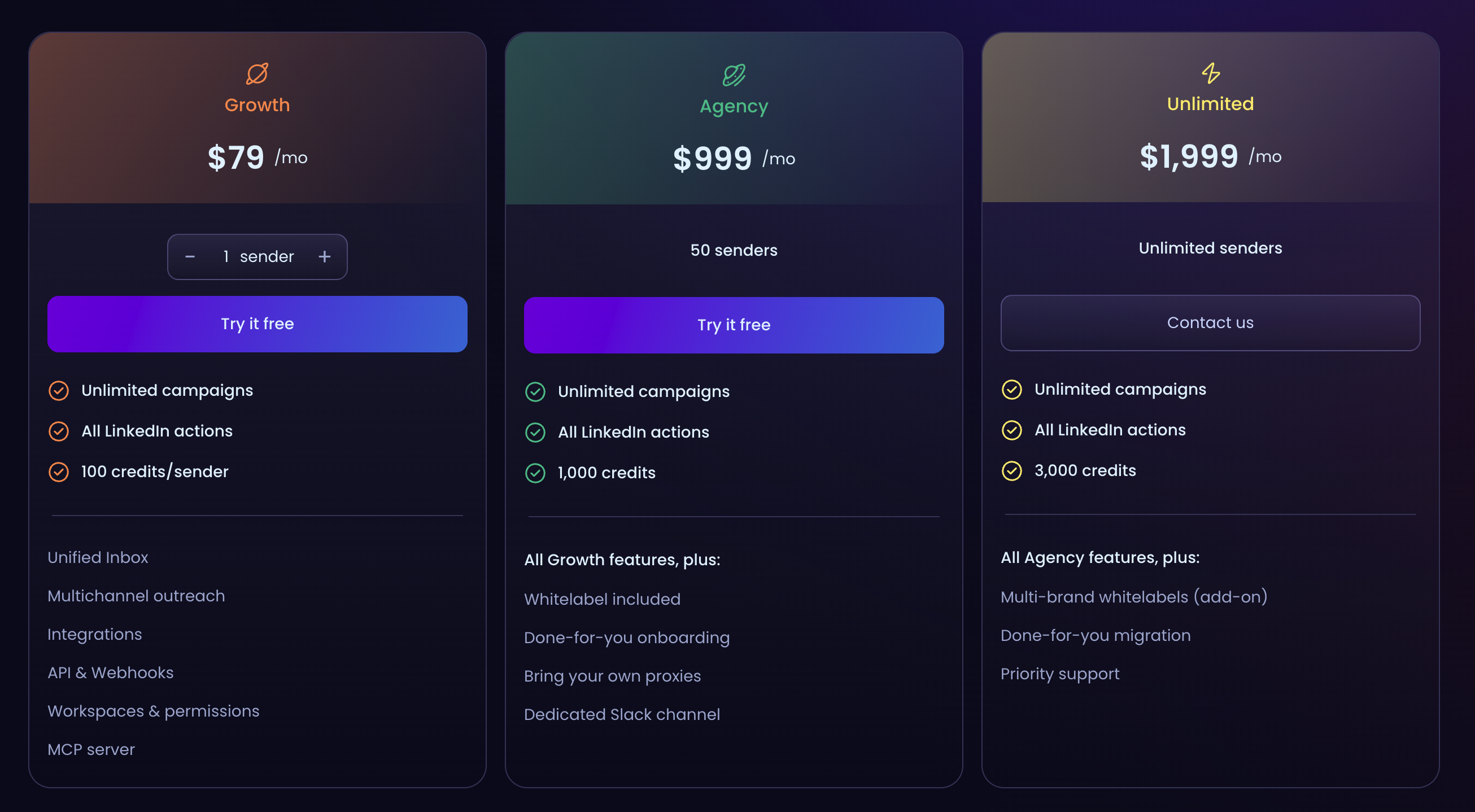
Growth $79/mo · Agency $999/mo · Unlimited $1,999/mo
Growth is $79/mo per sender with unlimited campaigns, all LinkedIn actions, 100 credits/sender, unified inbox, multichannel outreach, integrations, API and webhooks, and workspaces and permissions. Agency is $999/mo for 50 senders and includes 1,000 credits, white-label, done-for-you onboarding, bring-your-own proxies, and a dedicated Slack channel. Unlimited is $1,999/mo for unlimited senders with 3,000 credits, multi-brand white-label (add-on), done-for-you migration, and priority support.
HeyReach in action
✅ Pros
- +The cleanest agency outreach model: scale senders, not seats
- +Unified inbox across every client account
- +White-label and MCP server for agency-grade workflows
❌ Cons
- −Entry price per sender is higher than Dripify or Linked Helper
- −No content scheduling or inspiration library
- −Agency and Unlimited plans are a jump in cost without the sender volume to justify it
Who is HeyReach best for?
HeyReach is the right pick if you run a lead-gen agency with multiple client LinkedIn accounts. Individual founders and small teams will find it overbuilt for their needs.
8. Gojiberry - best for B2B founders and SDRs who want AI-scored warm leads from intent signals
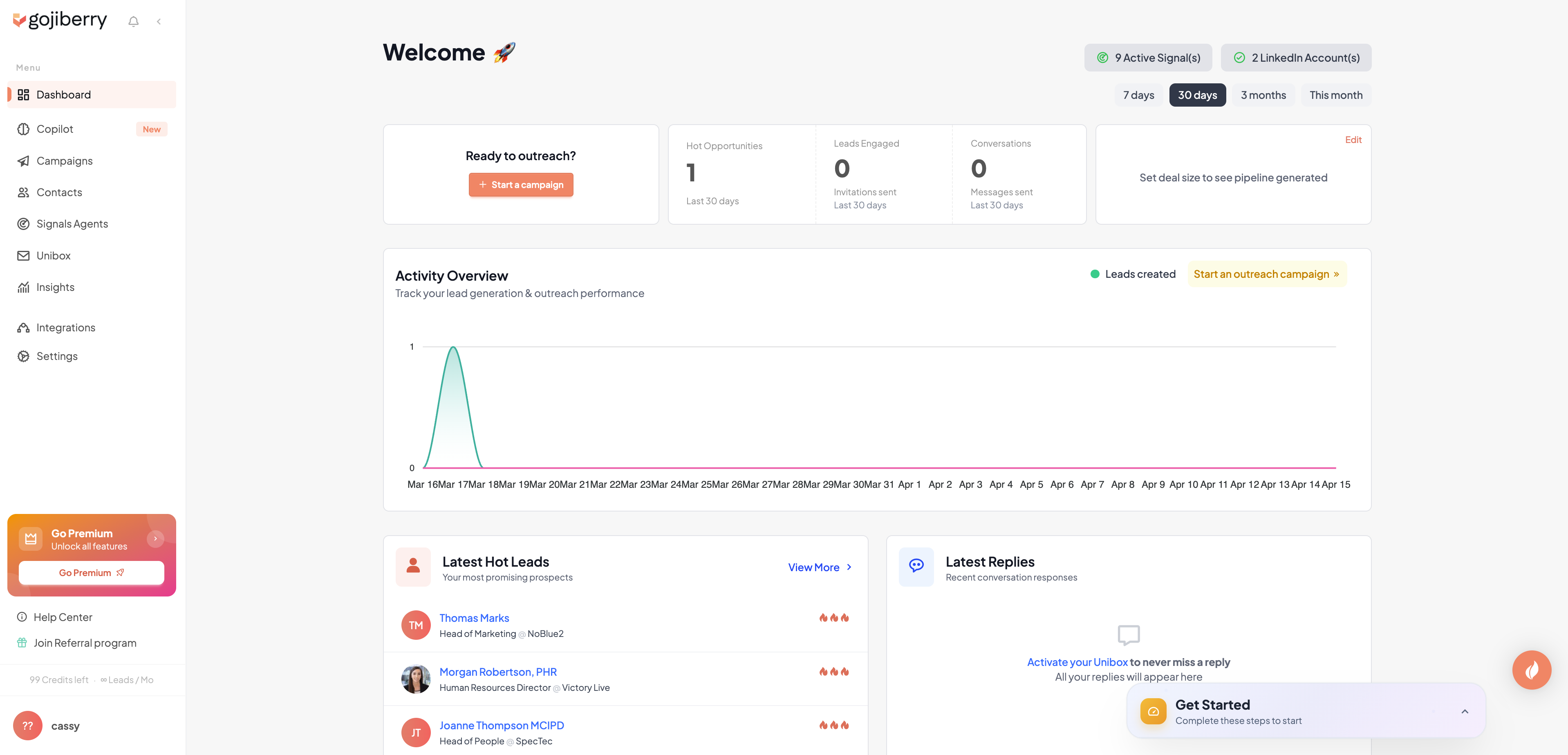
Gojiberry is the intent-signal tool. Instead of blasting cold messages, it watches 30+ intent signals across LinkedIn (role changes, company news, engagement on competitor posts) and scores the warmest prospects for you. It's outreach with a scope; no cold-blast mentality.
What is Gojiberry?
Gojiberry is an AI-powered LinkedIn outreach platform built for B2B teams. It runs campaigns driven by intent signals, scores leads with smart lead scoring, enriches with an email waterfall across 15+ data providers, and integrates with HubSpot, Pipedrive, and other CRMs.
Why Gojiberry stands out
- 30+ intent signals trigger outreach only when prospects show actual buying behavior.
- AI-powered smart lead scoring prioritizes the warmest leads automatically.
- Email waterfall enrichment across 15+ data providers built in.
- 2 LinkedIn senders on the Pro plan, enough for a founder plus an SDR.
- Native integrations with HubSpot, Pipedrive, and other CRMs.
Gojiberry pricing
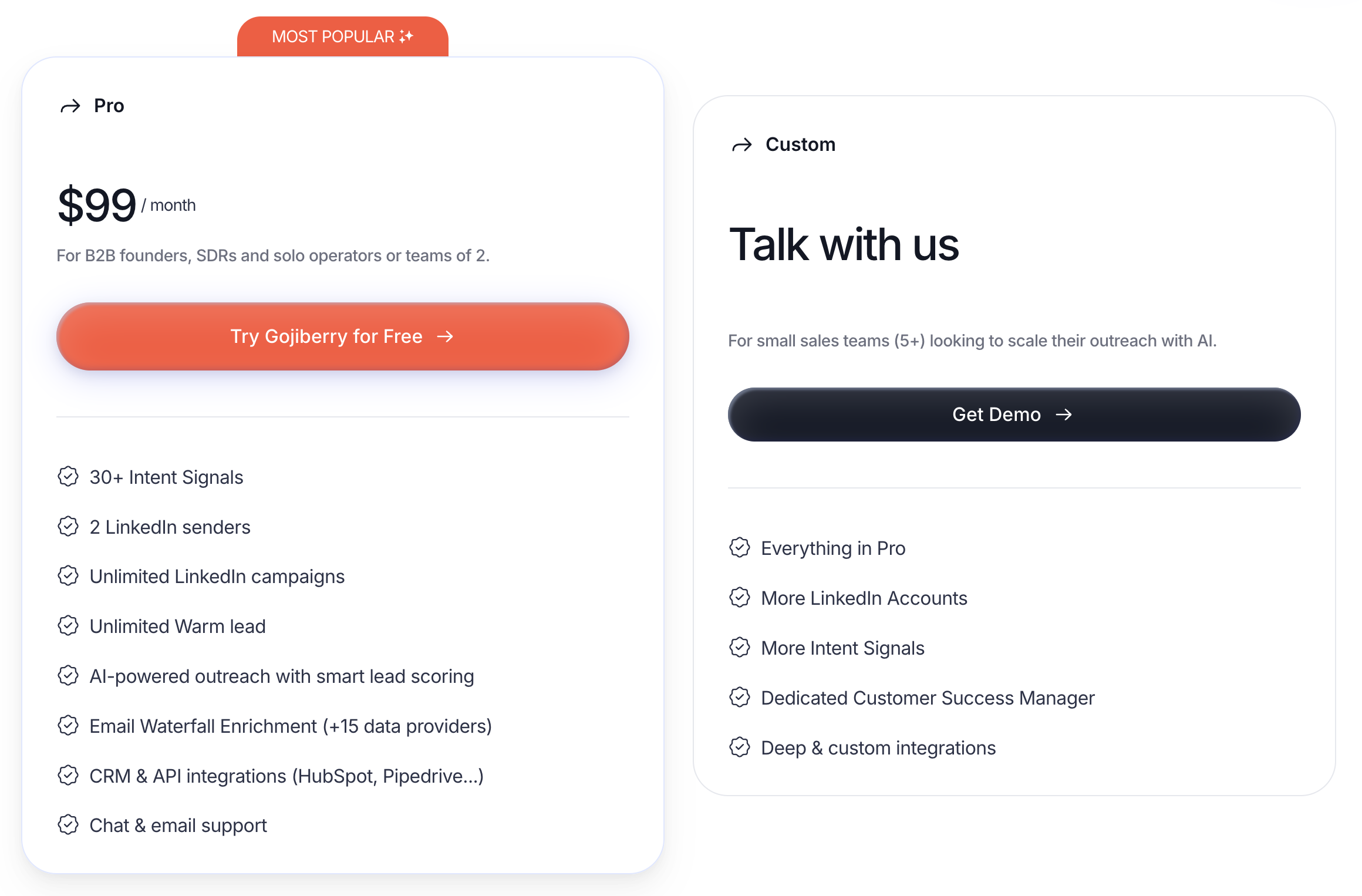
Pro $99/mo · Custom for teams of 5+
Pro is $99/mo (Most Popular) for B2B founders, SDRs, and solo operators or teams of 2, with 30+ intent signals, 2 LinkedIn senders, unlimited LinkedIn campaigns, unlimited Warm lead, AI-powered outreach with smart lead scoring, email waterfall enrichment across 15+ data providers, CRM and API integrations (HubSpot, Pipedrive, and more), and chat and email support. Custom pricing is available for small sales teams (5+) who want to scale outreach with AI; it adds more LinkedIn accounts, more intent signals, a dedicated Customer Success Manager, and deep custom integrations.
Gojiberry in action
✅ Pros
- +Intent signals replace spray-and-pray cold outreach
- +Built-in email waterfall saves a separate enrichment tool
- +Warm-lead focus dovetails with a content strategy
❌ Cons
- −Pro is capped at 2 senders; larger teams need Custom
- −No content scheduling or publishing
- −Newer product, so community and docs are still growing
Who is Gojiberry best for?
Gojiberry is the right pick if you're a B2B founder or small team tired of cold-blast tools and want outreach only when a prospect is warm. Pair it with a scheduler like Postbeam if you also want to publish.
9. Go Extrovert - best for creators who want to build reach through thoughtful AI-assisted comments on other people's posts
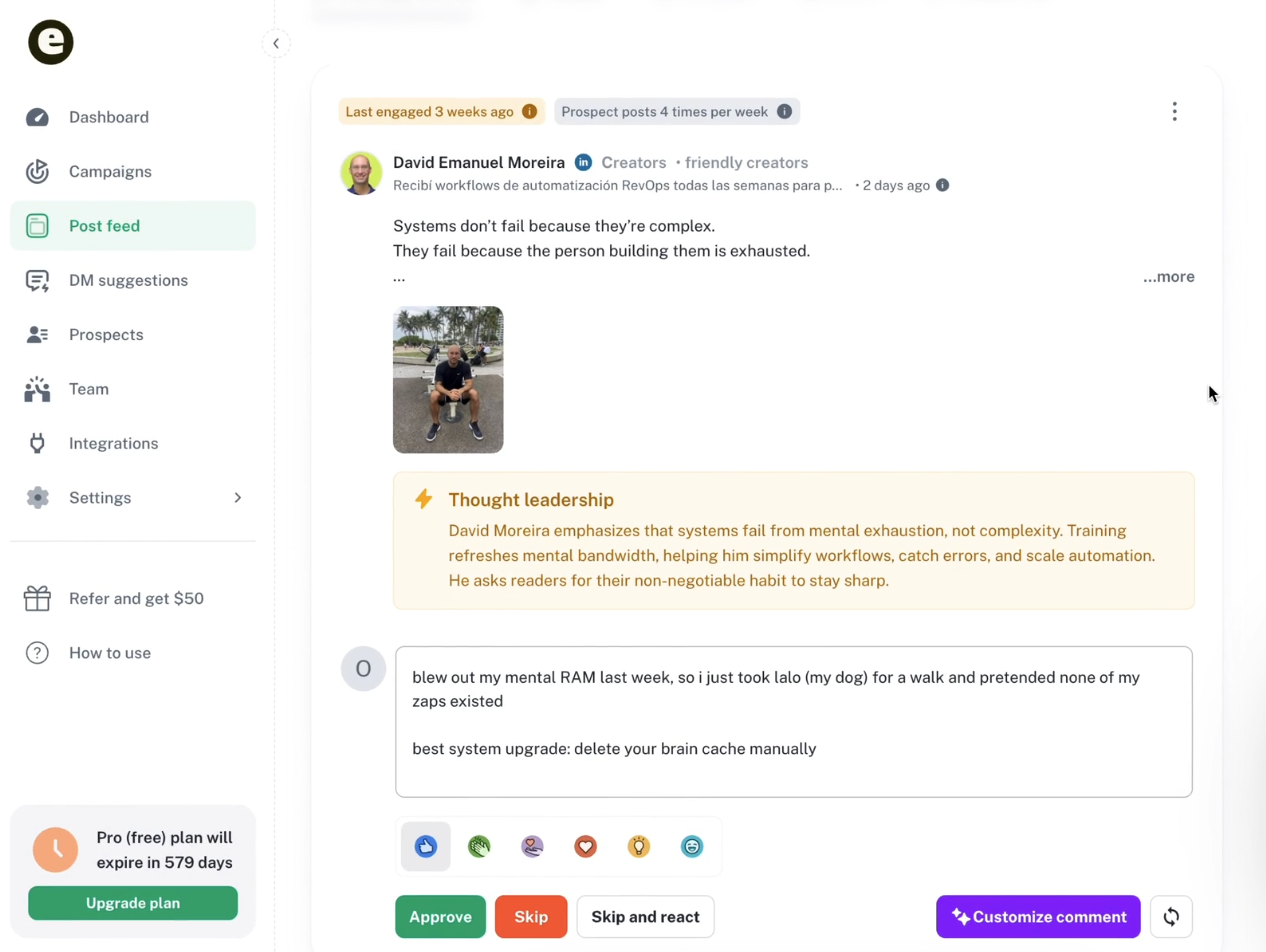
Go Extrovert is the comment-automation tool. Instead of publishing posts or sending cold DMs, it generates AI comment drafts on prospect posts, topic feeds, and thought-leadership content. You approve, skip, or customize each one. It's the only tool in this list focused purely on engagement, not publishing or outreach.
What is Go Extrovert?
Go Extrovert is an AI commenting assistant for LinkedIn. You set up topic feeds and prospect lists, and it suggests comments on new posts in your feed. Every suggestion is editable; you approve, skip and react, or customize before posting. It supports writing styles, personal context, and team-wide campaigns.
Why Go Extrovert stands out
- AI comment drafts generated from custom feeds, prospect lists, and topic monitoring.
- Writing-style presets plus personal context so comments sound like you, not a bot.
- Approve, skip, or customize each suggestion; nothing posts without your review.
- Business plan adds multi-seat team workflows, managed accounts, API integrations, and DM suggestions.
- Pro plan reaches silent prospects and delays comment posting to look organic.
Go Extrovert pricing
Light $35/seat/mo · Business $69/seat/mo · Pro $99/seat/mo
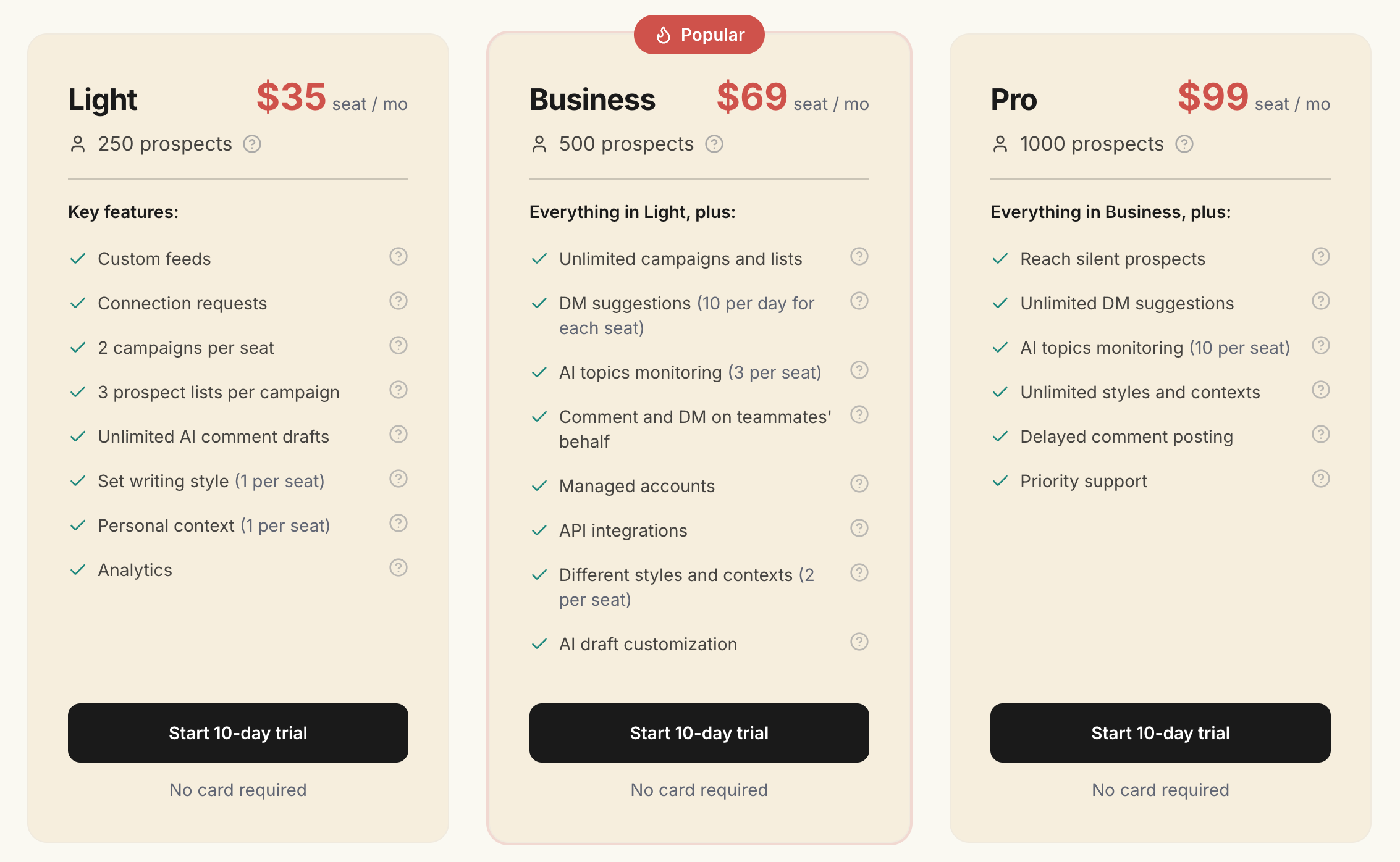
Light is $35/seat/mo for 250 prospects with custom feeds, connection requests, 2 campaigns per seat, 3 prospect lists per campaign, unlimited AI comment drafts, writing style (1 per seat), personal context (1 per seat), and analytics. Business is $69/seat/mo (Popular) for 500 prospects and adds unlimited campaigns and lists, DM suggestions (10 per day for each seat), AI topics monitoring (3 per seat), comments and DMs on teammates' behalf, managed accounts, API integrations, 2 styles and contexts per seat, and AI draft customization. Pro is $99/seat/mo for 1,000 prospects and adds reaching silent prospects, unlimited DM suggestions, unlimited AI topics monitoring, unlimited styles and contexts, delayed comment posting, and priority support. All plans include a 10-day trial; no card required.
Go Extrovert in action
✅ Pros
- +Fills the gap most automation tools miss: engaging others, not just publishing or cold DMs
- +AI comments with style and context presets avoid the bot-speak trap
- +Approval loop keeps you in control of what lands on your profile
❌ Cons
- −Doesn't schedule your own posts or run cold outreach
- −Per-seat pricing gets expensive for team rollouts
- −Risk of over-automation if you stop reviewing drafts
Who is Go Extrovert best for?
Go Extrovert is the right pick if your LinkedIn strategy leans on commenting, not just posting. Pair it with a scheduler and you've got content plus distribution covered; pair it with Gojiberry and you've got engagement plus intent outreach.
Quick Comparison Table
| Tool | Starting Price | Category | Team Use | Best At | Best For |
|---|---|---|---|---|---|
| Postbeam | $39/user/mo (Team) | Content + Intent Outreach | ✅ Yes | Warm leads from your content | B2B Teams |
| Expandi | $99/mo/seat | Cold Outreach | ✅ Agency | Safe high-volume cold outbound | Sales Teams |
| Dripify | $59/user/mo | Drip Campaigns | ✅ Advanced tier | Visual LinkedIn + email drips | Solo SDRs |
| Linked Helper | $15/mo | Desktop Automation | ⚠️ Per-license | Cheapest serious automation | Budget Operators |
| Phantombuster | $69/mo | Scraping + Chains | ✅ Yes | Multi-platform data + flows | Growth Hackers |
| Taplio | $39/mo | Content + Solo Outreach | ❌ Solo only | Inspiration library + hooks | Solo Creators |
| HeyReach | $79/sender | Agency Outreach | ✅ Unlimited senders | Multi-account agency outreach | Agencies |
| Gojiberry | $99/mo | Intent-Signal Outreach | ⚠️ 2-sender cap | AI-scored warm leads | Founder-led B2B |
| Go Extrovert | $35/seat/mo | Comment Automation | ✅ Business tier | Engaging others' content | Creators & SDRs |
How to pick the right LinkedIn automation tool
Start by picking a category, not a tool. Here's a decision guide by what you actually want to accomplish:
If…
You want LinkedIn content and warm-lead outreach in one system for a B2B team
→ Postbeam. The only tool that turns your own posts into ranked warm leads filtered by ICP, with team scheduling built in.
If…
You run a sales team doing cold outbound and need anti-detection features
→ Expandi. Dedicated IPs, profile warmup, and a Builder flow make it the safest cloud rig for cold outreach at volume.
If…
You're a solo SDR who thinks in drip campaigns with conditional branches
→ Dripify. The cleanest visual drip builder in the category, with LinkedIn and email steps in the same flow.
If…
You want the cheapest serious automation and will keep a desktop app running
→ Linked Helper. At $15/mo, nothing else matches. You trade UX and cloud convenience for price.
If…
You need to scrape LinkedIn data and chain it into other platforms
→ Phantombuster. The widest library of LinkedIn Phantoms plus cross-platform chains nothing else comes close to.
If…
You're a solo creator building a personal brand with viral-post inspiration
→ Taplio. Largest inspiration library, strongest hook generator, and auto-DM features on the Pro tier.
If…
You run a lead-gen agency with many client LinkedIn accounts
→ HeyReach. Senders, not seats. Unified inbox, white-label, and an Unlimited tier built for scale.
If…
You're a founder tired of cold blasts and want outreach only on intent signals
→ Gojiberry. 30+ intent signals and AI-scored leads replace spray-and-pray with warm-only outreach.
If…
You want to build reach by commenting thoughtfully on other people's posts
→ Go Extrovert. AI comment drafts with style and context presets keep comments sounding like you, at scale.
Frequently Asked Questions
What are LinkedIn automation tools?+
Are LinkedIn automation tools safe to use?+
What's the difference between content automation and outreach automation?+
Which LinkedIn automation tool is best for teams?+
How much do LinkedIn automation tools cost?+
Can LinkedIn automation tools get my account banned?+
Free LinkedIn Tools from Postbeam
LinkedIn Post Preview →
See how your post will look before publishing.
LinkedIn Text Formatter →
Add bold, italic, and special formatting to posts.
LinkedIn Character Counter →
Check your post against LinkedIn's 3,000-character limit.
LinkedIn Engagement Calculator →
Benchmark your engagement rate vs. industry averages.
Related Articles
7 Best LinkedIn Scheduling Tools in 2026 →
Ranked comparison of the top LinkedIn schedulers for content.
6 Best Taplio Alternatives for LinkedIn in 2026 →
Compare Taplio alternatives with honest pros, cons, and pricing.
LinkedIn Outreach Automation Guide →
How to build an outreach system that actually works.
50 LinkedIn Post Ideas That Get Engagement →
Never run out of content. 50 proven post ideas with hooks.
Ready to turn LinkedIn content into pipeline?
Start your 7-day free trial, no credit card required. AI scheduling, warm lead detection, and team features built for LinkedIn.
Start Your 7-Day Free Trial →